Apple Intelligence & Your Privacy: A Deep Dive into iOS 18’s AI Security
Introduction
The dust has settled from Apple’s WWDC 2024 keynote, and one announcement continues to dominate the conversation: Apple Intelligence. It’s Apple’s ambitious entry into the world of personal, generative AI, promising to make our iPhones, iPads, and Macs more helpful and intuitive than ever. But in an era where AI is often synonymous with data harvesting, a critical question hangs in the air: can we trust it with our most personal information?
Apple is betting its reputation on a resounding “yes.” They’ve built their new AI suite on a foundation of privacy, a principle that has become a cornerstone of their brand identity. But is this just clever marketing, or have they truly cracked the code for private, powerful AI?
This deep dive will cut through the noise to analyze the core of Apple Intelligence privacy. We’ll explore the groundbreaking trifecta of on-device processing, the innovative Private Cloud Compute, and the transparent integration of third-party models. You’ll learn exactly how iOS 18 aims to protect your data, what new privacy controls you’ll have at your fingertips, and how Apple’s approach fundamentally differs from its competitors. Get ready to understand the future of personal AI privacy.
What is Apple Intelligence? More Than Just Another Chatbot
Before we dissect its privacy architecture, it’s crucial to understand what Apple Intelligence is and, perhaps more importantly, what it isn’t. Unlike a standalone chatbot you summon for random queries, Apple Intelligence is a suite of intelligent features woven deeply into the fabric of iOS 18, iPadOS 18, and macOS Sequoia.
Its primary goal is to understand you and your personal context. It has secure access to your emails, messages, calendar, photos, and notes to perform actions and deliver insights that are uniquely relevant to your life.
Some of the key Apple AI features include:
- Writing Tools: System-wide proofreading, rewriting, and summarizing capabilities directly within the apps you use every day.
- Image Playground & Genmoji: Create original images and emojis based on simple text descriptions to add a personal flair to your conversations.
- Smarter Siri: A completely revamped Siri that understands natural language better, maintains context across requests, and can take actions within apps on your behalf.
- Priority Notifications: A new focus mode that uses AI to identify and surface your most important notifications, reducing digital clutter.
The very power of Apple Intelligence—its deep access to your personal data—is precisely why its privacy model is the most important part of its story. This isn’t about asking an AI for the capital of Nebraska; it’s about asking it to “summarize the email from Mom about the family trip” or “find the photos from my hike last weekend.” This level of access demands an unprecedented level of data protection Apple Intelligence.
The Three Pillars of Apple’s AI Privacy Strategy
Apple’s approach to AI privacy isn’t a single feature but a multi-layered strategy designed to process your data at the most secure location possible. This intelligent system constantly evaluates each request and routes it through one of three distinct pillars.
Pillar 1: On-Device Processing - The Gold Standard of AI Privacy
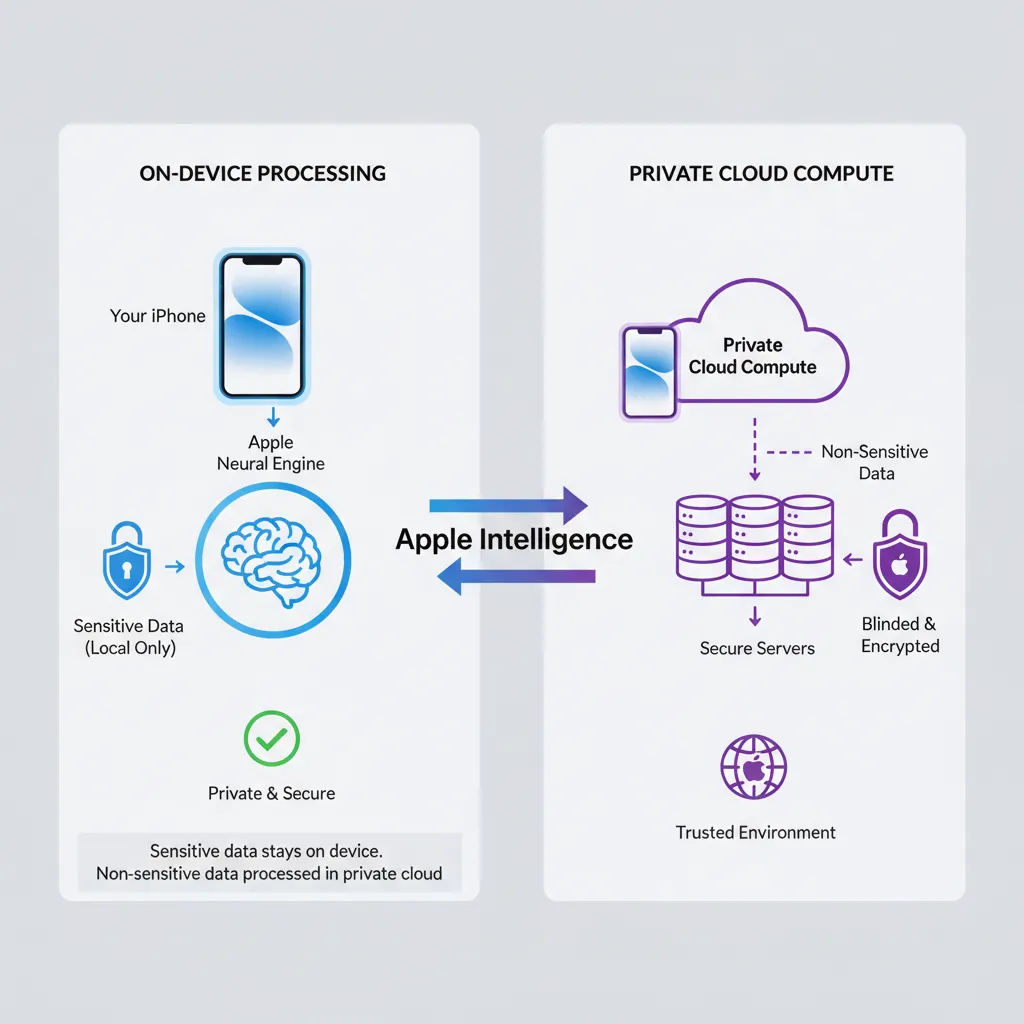
The first and most important pillar is on-device AI privacy. Whenever possible, Apple Intelligence will use the powerful Neural Engine in Apple’s A-series and M-series chips to process your requests directly on your iPhone, iPad, or Mac.
This is the ultimate form of privacy. Your data literally never leaves your device. It isn’t sent to a server, seen by Apple, or used to train any models. It stays with you, period. This local-first approach covers a surprising number of tasks, from organizing your notifications and proofreading a text to creating a simple Genmoji.
This commitment to maximizing on-device processing is a direct extension of the Apple ecosystem privacy philosophy we’ve seen for years. It’s what allows features like Face ID and on-device photo analysis to work without uploading your sensitive biometric or personal data to the cloud. The power of Apple silicon is the key enabler, allowing for sophisticated AI models to run efficiently without draining your battery or compromising your security. The future of personalized systems will heavily rely on such secure, on-device capabilities. Related: Hyper-Personalized AI: The Future of Tailored Intelligent Systems
Pillar 2: Private Cloud Compute - When Your iPhone Needs a Bigger Brain
Of course, not every AI task can be handled by a device in your pocket. More complex requests, like generating a detailed image or summarizing a long series of documents, require the kind of processing power that only server-grade hardware can provide. This is where competitors often send your data to their vast data centers, where it can be stored, analyzed, and used for model training.
Apple’s solution is radically different: Private Cloud Compute.
When your device determines a request needs more power, it can send the relevant data to special servers built with Apple silicon and a hardened, privacy-preserving operating system. This is what separates Apple’s strategy from traditional cloud AI.
How Does Private Cloud Compute Actually Work?
The term “cloud” can be scary, but Apple has gone to extraordinary lengths to ensure this cloud is as trustworthy as your device itself.
- Stateless Servers: This is the magic ingredient. Private Cloud Compute servers are designed to be “stateless.” This means they don’t have persistent storage. Your data is received, used in a secure memory environment to fulfill your request, and then it’s cryptographically destroyed. It is never saved, and no permanent user profile is ever built.
- Minimal Data Transmission: Your iPhone doesn’t just dump all your data to the cloud. It sends only the minimal, specific data required for that single task. For example, if you ask Siri to “find the document about the Q3 budget,” it sends the search query, not your entire document library.
- Cryptographic Guarantees: The entire process is encrypted end-to-end. Your device and the Private Cloud Compute server establish a secure connection, ensuring no one can intercept the data in transit.
- Independently Verifiable: In a move to build trust and promote AI transparency Apple, the company has pledged to allow independent security experts to inspect the code that runs on their Private Cloud Compute servers. This is a bold claim that invites public scrutiny and demonstrates confidence in their Apple AI data security.
This intricate system for private AI processing ensures that even when your data leaves your device, it’s handled with the highest level of security and is never stored or used for anything other than your immediate request.
Pillar 3: Third-Party Models (ChatGPT) - A Transparent, Opt-In Gateway
Apple acknowledges that for broad world knowledge, larger models are sometimes necessary. To address this, they’ve integrated OpenAI’s ChatGPT directly into Siri and the system-wide Writing Tools.
However, they have drawn a very clear line in the sand. This is not a behind-the-scenes data-sharing agreement.
- Explicit Permission: Your device will always ask for your permission before sending a query to ChatGPT. A pop-up will clearly state that your question is being sent to a third-party AI, giving you the choice to proceed or cancel.
- Privacy Protections in Place: When you do grant permission, Apple masks your IP address, and OpenAI has committed not to store these requests. For users who log in with a paid ChatGPT account, their data policies will apply, but for free, anonymous users, the privacy protections are robust.
This opt-in approach gives users access to the power of a massive Large Language Model without silently compromising the core Apple privacy policy AI. It treats external AI as a powerful tool to be used deliberately, not a default process that operates without your knowledge. Keeping up with the rapid development of such models is key to understanding the landscape. Related: GPT-5 Release Date, Rumors, and Leaked Features: What to Expect
A Practical Look at Your Privacy Controls in iOS 18
Theory is great, but how does this translate to your daily use? The new iOS AI privacy features are designed to be both powerful and intuitive, giving you clear control over your data.
In iOS 18, you can expect to see new visual indicators that tell you exactly where your request is being handled. A small, on-device icon might signify local processing, while a cloud icon will appear when Private Cloud Compute is engaged. This transparency is a core part of the user experience.
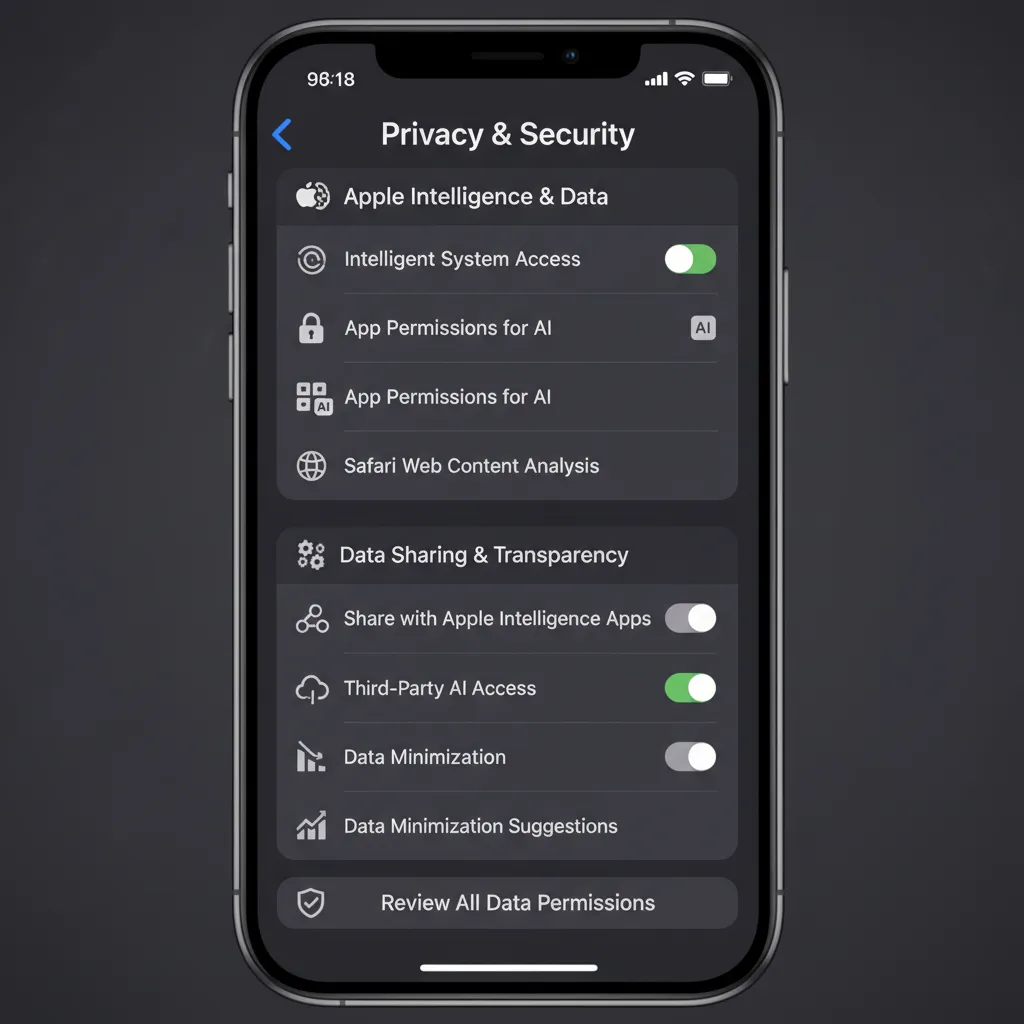
Within the Settings app, you’ll find a dedicated section for Apple privacy controls related to Apple Intelligence. Here, you’ll likely be able to:
- See which apps have requested access to use Apple Intelligence.
- Revoke permissions on an app-by-app basis.
- Potentially disable certain cloud-based features if you prefer to stick to on-device-only AI.
This granular control ensures that the user, not the system, is the ultimate authority on how their personal information is used by AI.
How Does Apple’s Approach Compare to Google and Microsoft?
To truly appreciate the secure AI features Apple is introducing, it helps to compare them to the prevailing approaches in the industry.
- Google (Gemini & Android): Google’s business model has historically been built on data. While they are increasingly incorporating on-device models, their ecosystem is fundamentally cloud-first. Gemini is deeply integrated into their services, and the data processed is often used to improve their models and personalize ads. The line between serving the user and training the AI is often blurred.
- Microsoft (Copilot & Windows): Microsoft is aggressively integrating its Copilot AI across its entire product suite, primarily leveraging the power of the cloud. The recent controversy around their “Recall” feature—which constantly took screenshots of a user’s activity—serves as a stark reminder of a “features-first, privacy-later” approach. While they backtracked, it highlighted a fundamentally different philosophy from Apple’s privacy-by-design model. The ongoing disruption in search is another arena where these giants are competing fiercely. Related: Is Google’s AI Search the End of Traditional SEO?
Apple’s hybrid model, with its uncompromising default to on-device processing and a verifiably private cloud as a backup, is a unique and compelling proposition in the market. It’s a direct challenge to the notion that users must trade their privacy for powerful AI.

AI Ethics and Transparency: Can We Trust Apple’s Promises?
Ultimately, this all comes down to trust. Apple is making a massive privacy commitment, and while the technical architecture is impressive, users are right to be skeptical.
The key to building this trust lies in AI ethics Apple and transparency. The promise to let independent researchers audit the Private Cloud Compute code is a significant step that no other major tech company has taken. If they follow through, it will provide a level of public verification that could set a new industry standard.

Furthermore, Apple’s business model supports its privacy claims. They make money selling premium hardware and services, not by monetizing user data through advertising. This fundamental difference means their incentives are aligned with protecting user information, not exploiting it. This principle extends to all areas where AI is making an impact, from personal finance to medicine. Related: The AI Revolution in Your Wallet: How AI is Reshaping Personal Finance
Conclusion
Apple Intelligence is more than just a new set of features; it’s a statement. It’s Apple’s vision for a future where powerful, truly personal AI can coexist with an unwavering commitment to user privacy. The three-pillar strategy—on-device first, a stateless private cloud second, and transparent opt-in to third parties—is a masterclass in privacy engineering.
By building on the foundation of their powerful silicon and their established brand trust, Apple has drawn a clear line in the sand. They are betting that users will choose an AI that works for them without secretly working for a data-harvesting machine.
As iOS 18 rolls out, we will all have the chance to experience these secure AI in iPhone features firsthand. The ultimate test will be in the execution, but the blueprint Apple has laid out is undeniably the most comprehensive and user-respecting approach to personal AI privacy we’ve seen to date.
Frequently Asked Questions (FAQs)
Q1. What is the core privacy principle of Apple Intelligence?
The core principle is processing data at the most secure level possible. It prioritizes on-device processing first. For more complex tasks, it uses a private, stateless cloud that doesn’t store user data, ensuring maximum Apple AI data security.
Q2. Does Apple use my data to train its AI models?
No. Apple has explicitly stated that data processed on-device or through Private Cloud Compute is never stored and is not used to train their AI models. Your personal information remains private.
Q3. What is Private Cloud Compute and how is it different from a regular cloud?
Private Cloud Compute is Apple’s custom solution for processing complex AI requests off-device. Unlike standard cloud services, it runs on Apple silicon, uses a secure OS, and operates on “stateless” servers, meaning your data is never stored and is deleted after your request is completed.
Q4. Is the ChatGPT integration in iOS 18 private?
Yes, it’s designed with privacy in mind. Your device will always ask for permission before sending a query to ChatGPT. For non-subscribers, Apple obscures your IP address, and OpenAI will not store the requests.
Q5. Can I choose not to use Apple Intelligence?
Yes. Apple Intelligence features are integrated into iOS 18, but their use is optional. You will also have granular Apple privacy controls to manage how and when the AI functions, and you can always opt-out of sending queries to third-party models like ChatGPT.
Q6. How does Apple’s AI privacy compare to Google’s?
Apple’s model is “privacy-first,” prioritizing on-device processing and using a non-storage cloud. Google’s model is generally “cloud-first,” and user data is often used to improve its services and AI models, aligning with its data-centric business model.
Q7. Will Apple Intelligence work on all iPhones?
No. Due to the high computational demands of the on-device models, Apple Intelligence will require an iPhone 15 Pro or newer, or Macs and iPads with an M1 chip or later. This hardware requirement is central to enabling its powerful on-device AI privacy features.