Unleashing Creativity: The Best AI Image Generators of 2024
Introduction: The Dawn of a New Creative Era with AI Image Generators
In an increasingly visual world, the demand for compelling and unique imagery has never been higher. From marketing campaigns to personal projects, high-quality visuals are crucial for capturing attention and conveying messages effectively. Enter the AI image generator – a groundbreaking technology that is fundamentally transforming how we create images with AI. No longer the sole domain of seasoned graphic designers or photographers, generative AI art empowers anyone, regardless of artistic skill, to manifest stunning visuals from simple text descriptions.
The year 2024 marks a pivotal moment in the evolution of artificial intelligence in creativity. What began as experimental tools capable of producing abstract or often uncanny images has blossomed into sophisticated AI art tools that generate incredibly realistic, diverse, and high-quality artwork. These best AI art generator platforms are not just gimmicks; they are powerful AI tools for artists, marketers, designers, and hobbyists, offering unprecedented speed, flexibility, and creative freedom.
This comprehensive guide will delve deep into the world of AI image creation, exploring the top contenders in 2024. We’ll examine the capabilities of industry leaders like Midjourney, DALL-E 3, and Stable Diffusion, alongside promising Midjourney alternatives and free AI image generator options. You’ll learn what makes a great AI photo creator, understand essential DALL-E 3 features, get insights into Stable Diffusion tutorial basics, and discover practical AI image generation tips to elevate your visual content. Whether you’re a creative professional seeking to enhance your workflow, a business looking for unique AI visual content, or simply curious about the future of AI art, prepare to unleash your creativity like never before.
What Exactly is an AI Image Generator and How Does it Work?
At its core, an AI image generator is a type of artificial intelligence program that can produce visual content based on specific inputs, most commonly textual descriptions, known as AI art prompts. This process is broadly categorized as text-to-image AI. It’s a revolutionary leap from traditional digital art methods, where artists painstakingly craft images stroke by stroke.
The Magic Behind Text-to-Image AI
The technology powering these generators relies heavily on advanced machine learning models, primarily Generative Adversarial Networks (GANs) and more recently, Diffusion Models.
-
Training Data: These AI models are trained on massive datasets containing billions of images paired with their descriptive captions. Over countless hours, the AI learns the intricate relationships between words and visual concepts – how a “sunset” looks, what a “dragon” entails, or the style of “impressionist painting.”
-
Prompt Interpretation: When you provide an AI art prompt like “A futuristic cityscape at dusk, cyberpunk style, neon lights, highly detailed, 8K,” the AI doesn’t just search for existing images. Instead, it interprets the components of your prompt, understanding the elements (“cityscape,” “dusk,” “neon lights”), the style (“cyberpunk”), and quality instructions (“highly detailed,” “8K”).
-
Generation Process: Using the patterns learned from its training, the AI then “generates” a new image from scratch. Diffusion models, for instance, start with random noise and gradually refine it, guided by the prompt, until a coherent image emerges. It’s akin to shaping clay, slowly bringing form to an amorphous blob.
This intricate process allows the AI to conceptualize and materialize visuals that have never existed before, making it an invaluable AI photo creator for unique AI visual content. The speed and variety with which these tools can operate are truly astounding, offering a new frontier for AI image creation.
Why Integrate AI Image Generators into Your Creative Workflow?
The adoption of AI image generators isn’t merely a trend; it’s a strategic move for anyone looking to stay competitive and innovative in the creative landscape. Here’s why these AI art tools are becoming indispensable:
1. Unprecedented Speed and Efficiency
Traditional graphic design and photography can be time-consuming. From conceptualization to execution, creating high-quality images often involves significant effort. AI image creation drastically cuts down this time. Need an image for a blog post, a social media graphic, or a design mockup? An AI can generate dozens of variations in minutes, not hours or days. This efficiency is a game-changer for content creators, marketers, and designers alike, freeing up valuable time for other critical tasks.
2. Democratizing Art and Design
You don’t need to be a skilled painter or a Photoshop expert to create images with AI. The power of these tools lies in their accessibility. Anyone can input a text prompt and generate compelling visuals, effectively democratizing art and design. This opens up creative avenues for small businesses, hobbyists, educators, and anyone with an idea but lacking the traditional artistic skills or resources. It’s truly a tool that empowers diverse users.
3. Infinite Creative Exploration and Ideation
Stuck in a creative rut? An AI image generator can be a fantastic brainstorming partner. By simply tweaking AI art prompts, you can explore endless variations of a concept, experiment with different styles, colors, and compositions. This ability to rapidly iterate and visualize ideas makes them powerful AI tools for artists and designers, pushing the boundaries of what’s possible and sparking new directions.
4. Cost-Effective Visual Content
Hiring photographers, illustrators, or purchasing stock photos can be expensive. While premium AI generators come with subscription fees, they often prove to be a more cost-effective solution for generating a vast quantity of unique AI visual content on demand. For those on a tight budget, free AI image generator options provide an excellent entry point without significant financial investment.
5. Bridging the Gap Between Concept and Reality
For writers, marketers, or product developers, articulating a visual concept to a designer can sometimes be challenging. With text-to-image AI, you can directly translate your ideas into visuals, providing a concrete example of what you envision. This streamlines communication and ensures everyone is on the same page, leading to more accurate and satisfying outcomes.
Key Features to Look for in the Best AI Image Generators
When evaluating the top AI generators of 2024, it’s crucial to understand what features differentiate a good tool from a truly exceptional one. The ideal AI photo creator balances power, usability, and flexibility.
1. Image Quality and Resolution
This is arguably the most critical factor. The best AI art generator should produce high-resolution, sharp, and aesthetically pleasing images. Look for tools that can generate images suitable for various applications, from web graphics to print, without significant loss of detail. The output should exhibit excellent AI image quality – clear, coherent, and free from artifacts.
2. Prompt Interpretation and Nuance
A sophisticated AI image generator can understand complex and nuanced prompts. It shouldn’t just respond to keywords but comprehend stylistic directives, emotional tones, and intricate relationships between elements. The ability to correctly interpret and execute a detailed AI art prompt is a hallmark of a powerful text-to-image AI.
3. Style Versatility and Artistic Control
Can the generator produce images in a wide range of styles – photorealistic, painterly, cyberpunk, cartoon, abstract? Does it offer options for artistic control, such as adjusting aspect ratios, lighting, composition, or even providing “seed” images for consistency? The more stylistic flexibility and control, the better it serves diverse creative needs.
4. Customization and Editing Capabilities
Beyond initial generation, can you refine and edit the AI-generated images within the platform? Features like inpainting (filling specific areas), outpainting (extending images), upscaling, and basic editing tools can significantly enhance the utility of an AI art software review would highly rate a tool for. Some advanced tools even allow you to combine multiple images or apply specific filters.
5. Speed and Efficiency
While all AI generators are fast, some are faster than others, especially when generating multiple variations or higher resolutions. For professionals needing quick turnarounds, generation speed is a significant consideration.
6. User Interface and Experience (UI/UX)
An intuitive and user-friendly interface is vital, especially for those new to generative AI art. The process of inputting prompts, managing generations, and accessing features should be straightforward and enjoyable.
7. Community and Resources
A strong community, comprehensive documentation, and tutorials can be incredibly helpful. Platforms with active communities often offer prompt-sharing, inspiration, and support, enhancing the learning curve for how to use AI for art.
8. Cost and Accessibility
While many free AI image generator options exist, premium tools offer more features, faster generation, and better quality. Evaluate the pricing models (subscriptions, credit systems) against your usage needs and budget.
Top AI Image Generators of 2024: A Detailed Review
The landscape of AI image generators is dynamic, with new innovations emerging constantly. Here’s a look at the leading contenders in 2024, examining their unique strengths and target audiences.
1. Midjourney: The Artistic Visionary
Midjourney has quickly become synonymous with high-quality, aesthetically stunning generative AI art. It’s renowned for its unique artistic style, often producing images that feel more like traditional art than computer-generated visuals.
-
Strengths:
- Unparalleled Aesthetic Quality: Often generates images with a distinctive, often surreal and beautiful, artistic flair. Its outputs are consistently praised for their composition, lighting, and mood.
- Strong Community: Operates primarily through Discord, fostering an active and collaborative community where users share prompts, tips, and inspiration. This makes learning how to use AI for art with Midjourney highly engaging.
- Rapid Development: Continuously updates with new versions, significantly improving capabilities and adding features.
- Advanced Prompt Engineering: While it can be quirky, mastering Midjourney’s prompt syntax (including parameters for aspect ratio, style weight, etc.) allows for immense creative control.
-
Best For: Artists, designers, concept artists, and anyone prioritizing artistic quality and unique visual aesthetics. It’s excellent for creating illustrative art, character designs, and abstract concepts.
-
Considerations: Not free (requires a subscription). Can have a learning curve due to its Discord-based interface and specific prompting syntax.
2. DALL-E 3 (via ChatGPT Plus/Enterprise): The Intelligent Illustrator
Developed by OpenAI, DALL-E 3, especially when integrated into ChatGPT Plus/Enterprise, offers a significant leap in understanding and generating images directly from natural language.
-
Strengths:
- Exceptional Prompt Understanding: DALL-E 3 excels at interpreting complex, multi-faceted prompts. It’s incredibly good at understanding nuances, text within images, and specific instructions, making DALL-E 3 features stand out in logical coherence.
- Ease of Use: When accessed through ChatGPT, it feels like a natural conversation. You can iterate on ideas, ask for revisions, and even provide highly detailed explanations without needing complex prompt engineering.
- Text Integration: Its ability to accurately render text within images is a major advantage over many competitors, making it suitable for logos, signs, and graphic design elements.
- Versatility: Capable of generating a wide range of styles, from photorealistic to cartoonish, making it a versatile AI photo creator.
-
Best For: Marketers, content creators, educators, and anyone needing highly specific images that match complex descriptions, especially those requiring text integration or rapid iteration through conversational prompts. For those looking to quickly create images with AI based on clear instructions, DALL-E 3 is a top choice.
-
Considerations: Requires a ChatGPT Plus or Enterprise subscription. While powerful, some purist artists might find Midjourney’s raw aesthetic more appealing for certain styles.
3. Stable Diffusion: The Open-Source Powerhouse
Stable Diffusion, developed by Stability AI, stands out as a powerful open-source AI image generator. Its flexibility and customizability have made it a favorite among developers and advanced users.
-
Strengths:
- Open-Source and Customizable: Being open-source means it can be run locally (if you have the hardware), tweaked, and extended by anyone. This has led to an explosion of custom models (checkpoints) and extensions, offering unparalleled creative control.
- Active Community and Resources: A massive community contributes to its development, offering countless tutorials, models, and tools. Finding a Stable Diffusion tutorial for almost any use case is easy.
- Free AI Image Generator Options: While more powerful versions might require local hardware, numerous web-based interfaces and services offer free AI image generator access to Stable Diffusion’s capabilities.
- Diverse Applications: From hyper-realistic photos to anime and abstract art, Stable Diffusion can be fine-tuned for virtually any artistic style.
-
Best For: Developers, hobbyists with technical expertise, users seeking maximum control and customization, and those who want a free AI image generator with immense potential. It’s also excellent for AI image editing through techniques like inpainting and outpainting.
-
Considerations: Can be resource-intensive if running locally. The sheer number of options and custom models can be overwhelming for beginners.
4. Adobe Firefly: The Creative Suite Companion
Adobe’s foray into generative AI, Firefly, is designed to integrate seamlessly with its existing Creative Cloud ecosystem, offering a powerful AI design software solution.
-
Strengths:
- Seamless Adobe Integration: Works directly within Photoshop, Illustrator, and other Adobe applications, streamlining workflows for existing Adobe users. This makes it an intuitive AI tool for creative professionals.
- Commercial Safety: Trained on Adobe Stock, openly licensed content, and public domain content, aiming to be safe for commercial use.
- Creative Control Features: Offers intuitive controls for style, color, and lighting, and features like “Generative Fill” and “Generative Expand” for precise AI image editing.
- Text Effects and Vector Graphics: Can generate unique text effects and even vector graphics (in Illustrator), expanding its utility beyond just raster images.
-
Best For: Adobe Creative Cloud users, graphic designers, marketing professionals, and anyone needing commercial-ready visuals that integrate with a professional design workflow. It’s a strong contender for AI graphic design.
-
Considerations: Primarily part of the Adobe ecosystem, which can be a barrier for non-subscribers. While improving, its raw image generation might not always match the artistic flair of Midjourney or the open-source flexibility of Stable Diffusion for all tasks.
5. Canva AI Image Generator: Design for Everyone
Canva, renowned for its user-friendly graphic design platform, has integrated its own AI photo creator, making AI visual content generation accessible to millions.
-
Strengths:
- Extreme Ease of Use: Perfectly integrated into Canva’s drag-and-drop interface, making it incredibly simple for anyone to create images with AI directly within their design projects.
- Ideal for Beginners: Requires no prior experience with AI or complex prompting.
- Templates and Design Tools: Leverages Canva’s extensive library of templates and design elements, allowing users to quickly incorporate AI-generated images into complete designs for AI for social media graphics or presentations.
- Free AI Image Generator Option: Offers a generous free tier for basic AI image generation.
-
Best For: Small business owners, social media managers, educators, and individuals who need quick, easy-to-create visuals for presentations, social media, and marketing without a steep learning curve. Excellent for AI for marketing images.
-
Considerations: While convenient, the creative control and raw image quality might not always match more specialized AI art generators. Prompts need to be relatively straightforward.
Other Notable Midjourney Alternatives and AI Art Tools:
- NightCafe Creator: Offers multiple AI models (Stable Diffusion, DALL-E 2, CLIP-Guided Diffusion) and a strong community, with daily challenges and options to mint NFTs. Good for exploring different AI art styles.
- Artbreeder: Focuses on “breeding” or combining existing images and concepts to generate new ones, excellent for iterative character design or abstract exploration.
- Lexica Art: A search engine for Stable Diffusion images that also offers its own image generation interface, making it easy to find inspiration and create images with AI.
- StarryAI: Another user-friendly mobile-first AI photo creator that offers various AI models and styles, often with a generous free tier.
Mastering the Art of AI Image Generation: Tips and Techniques
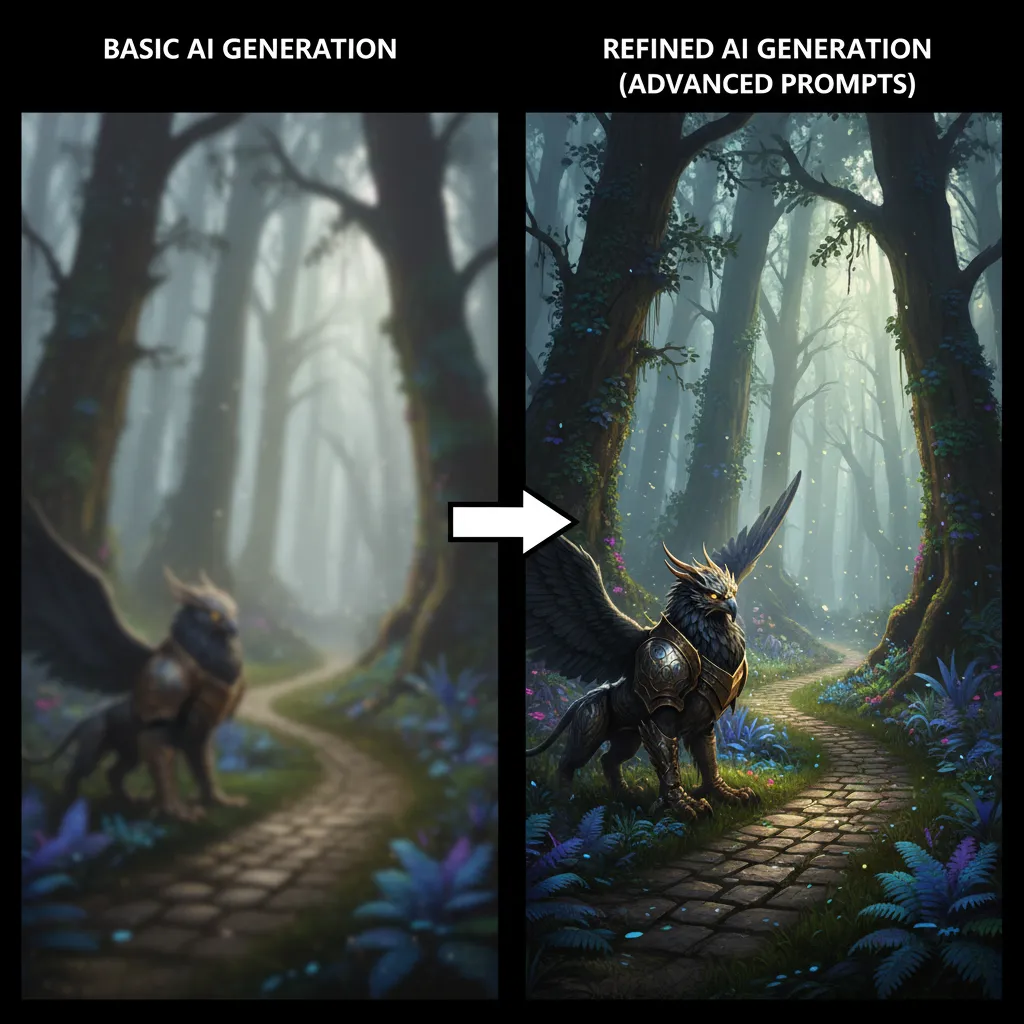
While AI image generators are powerful, getting the desired results often requires more than just typing a few words. Mastering AI art prompts and understanding some key techniques can significantly improve your AI image quality and creative output.
1. Crafting Effective AI Art Prompts
Your prompt is the instruction manual for the AI. The better the instructions, the better the outcome.
- Be Specific and Detailed: Instead of “dog,” try “a golden retriever puppy playing in a sunlit field, bokeh background, cheerful, hyperrealistic.”
- Specify Style and Medium: “Oil painting of a serene landscape,” “pixel art character running,” “cyberpunk city, cinematic shot.”
- Define Colors and Mood: “Vibrant, neon-lit alley,” “monochromatic portrait, melancholic,” “warm golden hour lighting.”
- Use Descriptive Adjectives: “Majestic,” “ethereal,” “gritty,” “futuristic,” “whimsical.”
- Include Technical Details (if applicable): “8K,” “cinematic,” “photorealistic,” “unreal engine,” “octane render,” “depth of field.”
- Exclude Unwanted Elements (Negative Prompts): Most advanced generators allow negative prompts (e.g.,
--no blur, ugly, deformedin Midjourney or a dedicated negative prompt box in Stable Diffusion UIs). This helps refine the output.
2. Iteration and Refinement
Rarely will your first prompt yield the perfect image. The process is iterative:
- Generate Multiple Variations: Most tools allow generating several images from one prompt.
- Identify What Works and What Doesn’t: Analyze the outputs. Which elements were successful? Which failed?
- Adjust and Regenerate: Modify your prompt based on your observations. Add more detail, remove ambiguous words, or change stylistic instructions.
- Use Seed Numbers (where available): Some generators allow you to use a “seed” number to recreate a similar image or explore variations of a specific generation.
3. Leveraging AI Image Editing for Perfection
AI generation is often a starting point. Combining it with traditional AI image editing techniques can elevate your work.
- Upscaling: Use dedicated upscalers (often built into the AI tools or available as separate software) to increase resolution without losing quality.
- Inpainting/Outpainting: For Stable Diffusion and Adobe Firefly, these techniques allow you to edit specific parts of an image or extend its canvas, respectively.
- Traditional Editing Software: Import your AI-generated images into Photoshop, GIMP, or other editors for final touches, color correction, composition adjustments, or adding specific elements.
4. Exploring Advanced AI Art Trends and Techniques
The field of AI for digital art is constantly evolving. Stay updated with AI art trends to expand your capabilities:
- ControlNet (Stable Diffusion): Allows precise control over composition, pose, and depth by using existing images as structural guides.
- LoRAs (Stable Diffusion): Small, fine-tuned models that allow you to generate specific styles, characters, or objects consistently.
- Style Transfer: Applying the artistic style of one image to the content of another.
- Custom Model Training: For advanced users, training your own AI model on a specific set of images can yield highly personalized results.
The Diverse Applications of AI Image Generation Across Industries
The utility of AI image generators extends far beyond simple novelty. They are powerful tools revolutionizing various sectors, from creative industries to marketing and education.
1. AI for Artists and Designers: Expanding Creative Horizons
For individual artists and professional designers, AI tools for artists are not replacing creativity but augmenting it.
- Concept Art and Ideation: Rapidly generate concepts for characters, environments, products, or fashion designs. This dramatically speeds up the initial brainstorming phase for game developers, animators, and illustrators.
- Digital Art Creation: Produce complete artworks in diverse styles, from hyperrealism to abstract expressionism.
- Graphic Design: Generate unique textures, patterns, backgrounds, and specific visual elements for logos, branding, and print materials. AI graphic design is becoming a standard practice.
- Storyboarding: Quickly visualize scenes and sequences for films, animations, or comic books, aiding in pre-production.
- Personalized Art: Create unique commissions or personalized gifts, offering bespoke AI image examples tailored to individual preferences.
- Interior Design & Architecture: Visualize different design options, material textures, and lighting conditions for spaces.
2. AI for Marketing and Advertising: Compelling Visuals on Demand
In marketing, visuals are king. AI for marketing images provides an endless supply of fresh content.
- Social Media Graphics: Quickly generate eye-catching visuals for daily posts, stories, and ads across platforms. This is invaluable for AI for social media graphics.
- Website and Blog Imagery: Create unique header images, featured images, and in-content visuals that perfectly match your articles’ themes, improving engagement and SEO. For example, our own blog uses AI to generate compelling visuals for articles like Supercharge Your Content: Top AI Tools for Creators in 2024 or The Canvas Awakens: AI Art Redefining Creativity.
- Product Mockups: Generate realistic mockups of products in various settings, for e-commerce, advertising, or presentations.
- Ad Campaign Visuals: Test multiple visual concepts for ad campaigns quickly to see which resonates most with target audiences.
- Email Marketing: Enhance newsletters and promotional emails with engaging, custom-generated imagery.
3. AI for Content Creation and Publishing: Visualizing Narratives
Writers, bloggers, and publishers can use AI visual content to bring their stories to life.
- Illustrations for Books and Articles: Generate unique illustrations that complement written content, making it more engaging.
- Cover Art: Create distinctive book covers, album art, or podcast thumbnails that stand out.
- Presentations: Quickly design visually rich slides for business, educational, or personal presentations.
4. AI for Education and Research: Learning Through Visuals
- Educational Materials: Generate diagrams, historical scene recreations, or concept visualizations to aid in learning.
- Scientific Visualization: Create abstract representations of complex data or theoretical concepts.
5. AI for Entertainment: New Forms of Media
- Game Asset Creation: Rapidly generate concept art, textures, and even 3D model bases for video games.
- Animated Short Films: Create backgrounds, characters, and stylistic elements for animation projects.
The Future of AI Art and Creativity: What’s Next?
The rapid evolution of AI image generators suggests an even more astounding future. We are still in the early stages, but the trajectory points towards deeper integration, enhanced control, and a broader impact on society and individual creativity.
1. Hyper-Personalization and Customization
Future AI models will likely offer even more granular control, allowing users to fine-tune every aspect of an image, from the exact brushstroke style to the specific facial features of a character. We might see AI design software that can learn a user’s unique artistic style and generate images consistently within that aesthetic.
2. Seamless Integration Across Platforms
Expect AI art tools to be embedded more deeply into everyday creative software – not just Adobe, but also video editors, 3D modeling programs, and even virtual reality environments. The line between AI generation and traditional editing will blur, making AI image editing an integral part of all creative workflows.
3. Multimodal AI: Beyond Text-to-Image
While text-to-image AI is powerful, the next frontier is multimodal AI that can take inputs from various sources: text, existing images, audio, video, and even biometric data to create visuals. Imagine describing a scene, humming a tune for its mood, and providing a rough sketch, all contributing to a single, rich visual output.
4. Ethical Considerations and Copyright
As generative AI art becomes more sophisticated, discussions around ethics, bias in training data, and copyright will intensify. Solutions for proper attribution, watermarking, and ensuring fair compensation for artists whose work informs AI models will be critical in shaping the future of AI art.
5. AI as a Collaborative Partner
Instead of merely being a tool, AI could evolve into a true creative partner, suggesting ideas, critiquing compositions, and even learning your aesthetic preferences over time. This collaborative model could push human creativity to unprecedented heights, making AI for creative professionals an even more integrated experience. We are already seeing similar collaboration in other AI tools, like those mentioned in AI Productivity Tools 2024 or Boost Your Day: Top 10 AI Productivity Tools for Peak Performance.
The AI art trends point towards a future where imagination is the only limit, and the tools to bring that imagination to life are more accessible and powerful than ever before.
Conclusion: Embrace the AI Creative Revolution
The landscape of visual content creation has been irrevocably changed by the advent of AI image generators. From the artistic prowess of Midjourney to the intelligent prompt understanding of DALL-E 3, the open-source flexibility of Stable Diffusion, and the integrated workflows of Adobe Firefly and Canva, these AI art tools are empowering creators across all skill levels and industries. They offer unparalleled speed, efficiency, and a boundless realm of creative exploration, truly unleashing creativity for everyone.
Whether you’re a professional designer seeking to streamline your workflow, a marketer needing constant AI visual content, or simply someone looking to create images with AI for personal enjoyment, there’s an AI image generator out there for you. By understanding their features, mastering AI art prompts, and staying abreast of AI art trends, you can harness the full potential of this revolutionary technology.
The future of AI art is not about replacing human creativity, but about augmenting it, opening new doors for expression and innovation. Embrace these powerful top AI generators, experiment with their capabilities, and watch as your creative visions come to life with unprecedented ease and brilliance. The only limit is your imagination.
Take Action: Start Your AI Art Journey Today!
Ready to dive into the exciting world of generative AI art? Explore the best AI art generator options mentioned in this guide, experiment with various AI art prompts, and discover how these tools can transform your creative process. Visit our blog for more insights into the latest AI innovations and how they can unlock peak productivity with the best AI tools or explore the AI revolution in healthcare and other fascinating applications of artificial intelligence.
FAQs
Q1. What is the best free AI image generator?
While “best” is subjective and depends on your needs, Stable Diffusion (via various online interfaces like DreamStudio or Hugging Face Spaces) and Canva’s AI Image Generator offer excellent free tiers for generating high-quality images. Many other platforms also offer limited free trials or daily credits.
Q2. How do AI image generators create images?
AI image generators primarily use advanced deep learning models, such as Generative Adversarial Networks (GANs) or Diffusion Models. They are trained on vast datasets of images and their descriptions. When given a text prompt, the AI interprets the language and uses its learned patterns to synthesize a completely new image that matches the description, effectively translating text into visual art.
Q3. Can I use AI-generated images commercially?
The commercial use of AI-generated images depends on the specific AI tool’s licensing terms and the origin of its training data. Tools like Adobe Firefly are trained on commercially safe data (Adobe Stock, public domain) and generally permit commercial use. For others, particularly open-source models like Stable Diffusion, it often depends on the specific checkpoint or model used and its license. Always check the terms of service for each platform you use.
Q4. What is the difference between Midjourney, DALL-E 3, and Stable Diffusion?
- Midjourney is known for its highly artistic and aesthetic outputs, often producing images with a unique, painterly or surreal style. It operates primarily through Discord.
- DALL-E 3 (via ChatGPT) excels in prompt understanding, accurately interpreting complex and nuanced text descriptions, and generating images with excellent textual accuracy. It’s very conversational and user-friendly.
- Stable Diffusion is an open-source model prized for its flexibility, customizability, and the vast ecosystem of community-developed models and extensions. It can be run locally and offers immense creative control for advanced users.
Q5. Are AI image generators suitable for beginners?
Absolutely! Many AI image generators are designed with user-friendliness in mind. Platforms like Canva’s AI tool and the conversational interface of DALL-E 3 (through ChatGPT) make it incredibly easy for beginners to start generating images with simple text prompts. While advanced tools like Midjourney and Stable Diffusion have a steeper learning curve, they also offer extensive tutorials and active communities to help new users.
Q6. How can I improve the quality of my AI-generated images?
To improve image quality, focus on crafting detailed and specific AI art prompts that clearly define the subject, style, mood, colors, and technical aspects (e.g., “photorealistic,” “8K”). Use negative prompts to exclude unwanted elements. Iterate and refine your prompts based on initial outputs, and consider using advanced features like inpainting, outpainting, and upscaling tools available in some generators or external editors.
Q7. What are some ethical concerns regarding AI art?
Ethical concerns include potential job displacement for artists, the issue of copyright and intellectual property when AI models are trained on existing artwork, the generation of harmful or biased content due to biases in training data, and the potential for misuse in creating deepfakes or spreading misinformation. Responsible AI development and clear guidelines are crucial for addressing these challenges.
Q8. Can AI image generators create images in specific artistic styles?
Yes, most advanced AI image generators are highly capable of creating images in a wide variety of artistic styles. You can specify styles like “oil painting,” “watercolor,” “cyberpunk,” “impressionistic,” “anime,” “pixel art,” “photorealistic,” “sketch,” and many more directly in your AI art prompts. The AI will then attempt to emulate that style based on its training data.