Apple Intelligence: A Guide to iOS 18’s New AI Features

The Dawn of Personalized Intelligence: iOS 18 AI Features
The tech world’s focus on Artificial Intelligence reached a fever pitch during the WWDC 2024 announcements, where Apple unveiled its highly anticipated, deeply integrated AI system: Apple Intelligence.
This isn’t just a set of isolated features; it’s a foundational shift designed to make your iPhone, iPad, and Mac proactively helpful, deeply personal, and, most importantly, rigorously private. This comprehensive guide will walk you through the core components of Apple Intelligence, the revolutionary iOS 18 AI features it unlocks, the critical privacy innovations like Private Cloud Compute, and the exciting creative possibilities that come with generative AI iPhone capabilities.
For years, we’ve used Apple devices to manage our digital lives. Now, with the launch of Apple Intelligence, the devices themselves are learning to understand the context of those lives, anticipating needs, and performing complex, multi-app tasks that were previously impossible. The entire ecosystem is being upgraded with on-device AI that promises speed, efficiency, and a level of contextual awareness AI previously unseen in consumer technology.
If you want to understand what is Apple Intelligence, how it will change the way you interact with your phone, and whether your current device is compatible, you’re in the right place. We are diving deep into the features that define the next generation Siri, the creative power of Genmoji iOS 18 and Image Playground AI, and the crucial framework that protects your data.
The Philosophy Behind Apple Intelligence: Privacy and Power
Apple has always differentiated itself through its dedication to user privacy. When it came time to embrace the current era of large language models (LLMs) and massive processing power, the company didn’t abandon that core principle—it innovated around it. The bedrock of Apple Intelligence rests on two pillars: on-device AI for speed and personalization, and Private Cloud Compute (PCC) for tasks requiring greater scale, all while maintaining strict user data security.
On-Device AI: Speed, Personalization, and Semantic Indexing
The bulk of the tasks handled by Apple Intelligence—such as prioritizing notifications, improving writing tone, or understanding basic requests—are processed directly on your device. This approach offers several massive advantages:
- Speed: Latency is near zero because data doesn’t leave the device, leading to instant responses.
- Privacy: Your personal data remains local, accessible only to the underlying AI models on your specific device.
- Personalization: The system can learn your habits, routines, and app usage patterns without having to upload that sensitive information to a remote server.
A core technology enabling this deep personalization is semantic indexing Apple. This system processes and organizes your personal data—emails, messages, photos, calendar events, and notes—not just by keywords, but by meaning and relevance.
For instance, if you ask the Apple AI assistant to “Find that article my friend Mike sent me last week about coffee shops in Paris,” the semantic index understands “Mike,” “last week,” “coffee shops,” and “Paris” as interconnected entities, providing precise results instantly. This capability fuels the powerful contextual awareness AI that is central to the entire system.
Unpacking Private Cloud Compute (PCC): Security and Scale
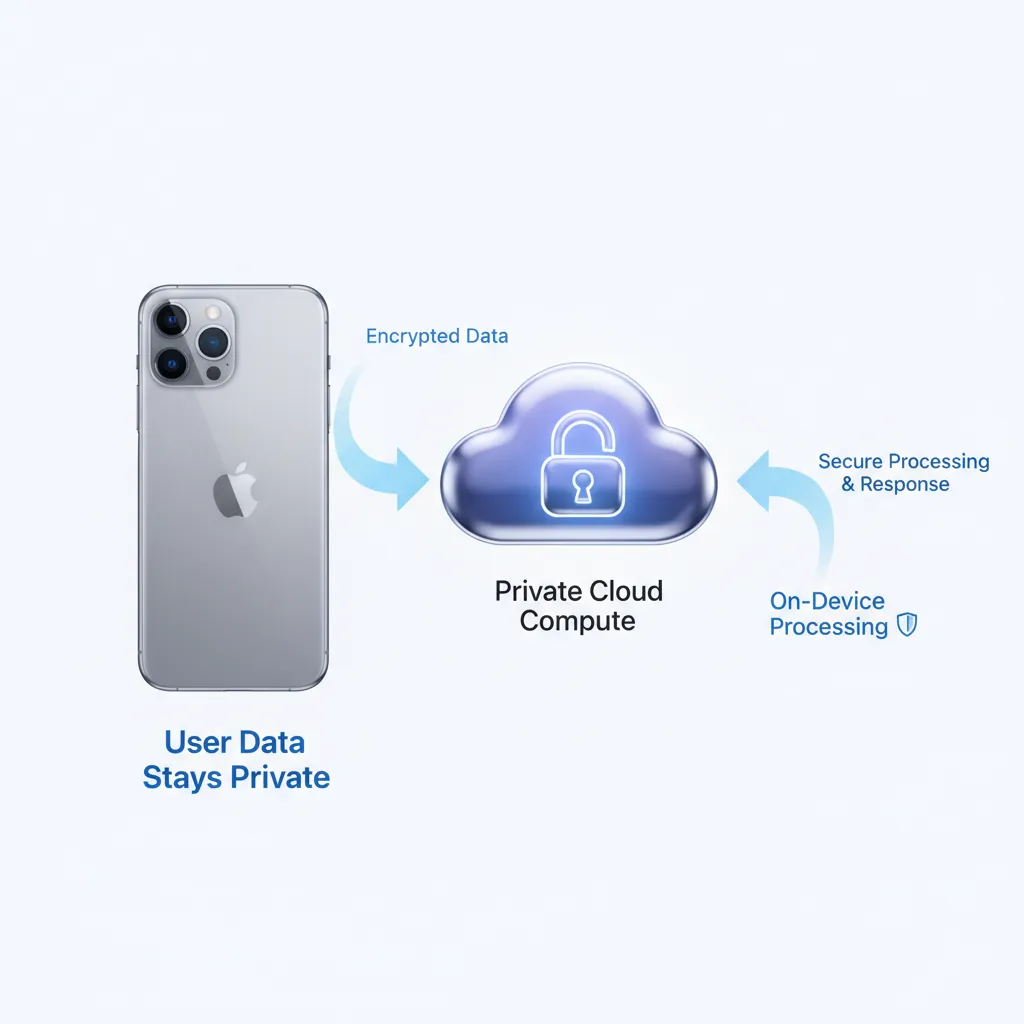
Not all AI tasks can be handled by the chip in your phone. Generating a complex image, summarizing an entire book, or running a massive LLM for an intricate question requires computational muscle far beyond a smartphone. This is where Private Cloud Compute (PCC) comes in, and it’s perhaps the most important innovation in Apple Intelligence privacy.
PCC involves dedicated Apple Silicon servers running optimized versions of the LLMs. But unlike traditional cloud computing, this system is architected with a novel security approach:
- Cryptographic Attestation: Before any data is sent, the user’s device verifies that the PCC server is running certified, unaltered software. This ensures the servers are incapable of logging or exposing user data.
- Ephemeral Processing: Requests are processed and immediately deleted. There is no persistent storage of user data or logs on Apple’s cloud servers.
- Data Minimization: Only the necessary data to fulfill the specific query leaves the device, and it is shielded by multiple layers of encryption.
This architecture means that when a request is too complex for on-device AI, it is safely and privately handled in the cloud, allowing Apple to offer state-of-the-art generative AI iPhone capabilities without compromising its strict privacy standards.
[Related: Smart Home Security: Privacy in a Connected World]
Apple Intelligence Supported Devices: Why Chipset Matters
A key question following the WWDC 2024 announcements was device compatibility. Unlike previous software updates, Apple Intelligence supported devices are limited due to the intense computational demands of running these large models locally.
To access the core Apple Intelligence features, including the new writing tools, next generation Siri, and Image Playground AI, your device must have an Apple A17 Pro chip or any M-series chip.
This currently limits the iPhone compatibility to the iPhone 15 Pro and iPhone 15 Pro Max. All models of iPad and Mac running M1, M2, M3, and M4 chips will support the features through iPadOS 18 AI and macOS Sequoia AI. This strict requirement underscores that Apple Intelligence relies heavily on the specialized Neutral Engine cores within the latest Apple Silicon for efficient on-device AI processing.
The Next Generation of Siri: Contextual Awareness and Power
The most obvious transformation brought by the iOS 18 AI features is the evolution of Siri. Once criticized for being rigid and task-specific, the new Siri features redefine the role of the digital assistant, making it a powerful, intuitive interface for your entire digital life.
Deep Integration and App Intents AI
The next generation Siri is no longer just a separate app; it is deeply woven into the system. Thanks to improved app intents AI and the new SiriKit for developers AI, Siri can now take complex, multi-step actions within and across applications.
- Cross-App Actions: You can ask Siri, “Take the photo I just edited in Photos and put it into the presentation I was working on in Keynote,” and Siri understands the context of both apps and executes the transfer.
- Screen Awareness: Siri can see what is on your screen. If a friend messages you their new address, you can activate Siri and say, “Add this address to their contact card,” without having to manually copy and paste. This level of contextual awareness AI is transformative for productivity.
Siri ChatGPT Integration: When and How
For the most complex queries, such as brainstorming ideas, generating intricate code, or seeking specialized knowledge, Apple has partnered with OpenAI to offer optional Siri ChatGPT integration.
When Siri determines a query requires world knowledge or advanced generation capabilities beyond its current scope, it will ask the user for permission to route the query (and relevant context, if necessary) to ChatGPT. This integration operates under strict privacy guidelines:
- User Permission: ChatGPT access is opt-in, never automatic.
- Anonymity: If used, the query is not logged by OpenAI, and user IP addresses are obfuscated.
- OpenAI’s Models: This integration utilizes the latest, most capable LLMs from OpenAI, giving Apple Intelligence access to top-tier generative power when needed.
This optional feature allows the Apple AI assistant to handle a broader range of user needs, covering both highly personal, local tasks and vast, general knowledge queries.
[Related: Best AI Tools for Personal Productivity in Daily Life]
Generative AI for Writing and Communication
One of the most practical and immediately impactful aspects of Apple Intelligence is the suite of AI writing tools Apple has implemented across iOS 18, iPadOS 18, and macOS Sequoia. These tools help users refine their voice, save time, and communicate more effectively, particularly in professional contexts.
AI Writing Tools Apple: Rewriting, Summarizing, and Proofreading
The new Writing Tools (dubbed “Writing Assistant”) are available system-wide in applications like Mail, Pages, Notes, and third-party apps that utilize standard text input APIs.
Users gain three primary functions:
- Rewrite: The AI can take your existing text and suggest different versions based on a requested tone (e.g., professional, friendly, concise, or dramatic). This is invaluable for crafting the perfect email or social media post.
- Summarize: This feature can condense long emails, complex documents, or lengthy text threads into digestible bullet points, allowing you to quickly grasp the key takeaways.
- Proofread: Beyond simple spelling and grammar checks, the AI focuses on clarity, coherence, and stylistic suggestions, making your writing sound more authoritative and natural.
This is a powerful demonstration of generative AI iPhone capabilities used for enhancing everyday productivity.
Smart Reply iOS 18 and Email Triage
Apple Mail receives a significant boost with smart reply iOS 18. Instead of providing generic, canned responses, the system generates sophisticated replies that are contextually relevant to the thread.
If an email contains a question or requests scheduling, Smart Reply will offer several personalized options. If the email is complex, the system can automatically summarize the thread before prompting a reply, helping users manage their inbox more efficiently.
AI Transcription Apple: Notes and Phone Calls
The integration of advanced large language models also enhances transcription capabilities. In iOS 18, the Notes app gains the ability to transcribe audio recordings in real-time. More dramatically, the Phone app offers AI transcription Apple for live phone calls.
When a user initiates a transcription (with full disclosure and notification to the other party), the device captures the conversation, transcribes it, and can even generate a summary afterward, making it easier to track action items and key decisions without needing to take manual notes. This feature further solidifies the role of Apple Intelligence as a robust tool for personal and professional organization.
[Related: Revolutionize Marketing with AI Automation]
Unleashing Creativity with Generative Media Tools
Beyond text and productivity, Apple Intelligence brings powerful generative AI iPhone features directly into the creative workflow. These tools are designed to be fun, accessible, and integrated into the messaging and photo experience.
Creating Genmoji iOS 18: Personalized Reactions
Tired of using the same old emojis? Genmoji iOS 18 allows users to create entirely custom emojis on the fly simply by typing a description.
Want an emoji of a “T-Rex wearing a chef’s hat and juggling tacos”? Apple Intelligence generates it instantly. These new Genmoji can be used as stickers, reactions in iMessage, or placed into text fields. They are not static images but a new dynamic asset class that reflects the user’s personality and the specific context of the conversation.
This is an example of creative AI being used for nuanced, personal communication, pushing beyond the limits of standard emoji sets.
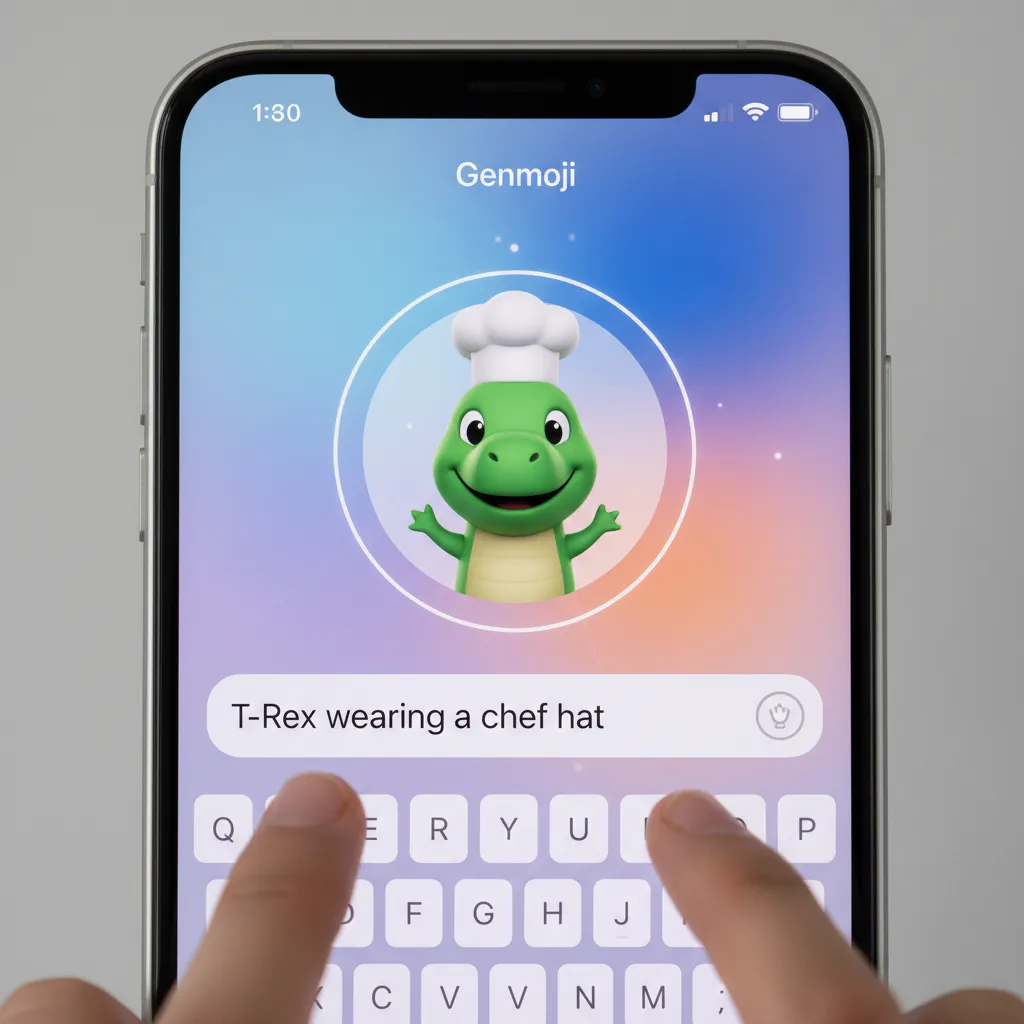
Image Playground AI: Instant Visual Creation
For more complex image generation, Apple introduced Image Playground AI. Integrated into apps like Messages, Notes, and Freeform, Image Playground lets users quickly generate images in three distinct styles: Sketch, Illustration, or Animation.
- Ease of Use: Users type a prompt (e.g., “A golden retriever flying a spaceship through a neon-lit canyon”) and select a subject, description, and style.
- Contextual Fill: In Photos, Apple Intelligence introduces powerful AI photo editing iOS 18 tools, including “Clean Up,” which can intelligently remove unwanted objects from the background while seamlessly blending the surrounding pixels.
Crucially, because Image Playground often uses on-device AI models (or relies on the highly secured Private Cloud Compute), generation is fast and ensures that the content created remains private until the user chooses to share it. The focus is on rapid, casual creation, making advanced generative AI accessible to everyone.

[Related: Unleash Creativity: The Rise of AI Video Generation in Content Creation]
Apple Intelligence Across the Ecosystem: iPadOS 18 and macOS Sequoia AI
Apple Intelligence is not limited to the iPhone; it’s a system-wide upgrade impacting all core operating systems. Both iPadOS 18 AI and macOS Sequoia AI benefit from the same core capabilities, often leveraging the M-series chips for even greater power.
Enhanced Continuity and Desktop Productivity
On the iPad and Mac, the AI writing tools and new Siri features are particularly impactful for long-form work.
- Notes in macOS Sequoia: Users can summarize multi-page documents or academic papers with a single click, instantly boosting research efficiency.
- Mail on iPadOS 18: Managing a professional inbox becomes seamless with enhanced smart reply iOS 18 and intelligent categorization powered by semantic indexing Apple.
- Focus on App Intents AI: Due to the more complex nature of desktop apps (like Final Cut Pro or Logic Pro), the enhanced app intents AI allows Siri to automate multi-step professional workflows. For example, a user could tell Siri to “Find all the video clips tagged ‘b-roll forest’ from last month, compile them, and send them to my editor,” executing actions across multiple folders and applications instantly.
The integration into macOS Sequoia AI ensures that the desktop experience remains a powerhouse of productivity, capable of handling complex computational demands while still maintaining the highest standards of Apple Intelligence privacy.
The Competitive Landscape: Apple AI vs Google AI
The entry of Apple Intelligence into the market forces a direct comparison with existing players, primarily Google (with Gemini) and Microsoft (with Copilot). While Google and Microsoft have emphasized scale, world knowledge, and broad platform accessibility, Apple’s differentiator is profoundly personal context and privacy.
Personal Context vs. World Knowledge
- Google AI (Gemini): Excels at accessing and synthesizing vast amounts of real-time web data. It is a powerful tool for general research, creative generation, and integrating with Google services (Gmail, Drive).
- Apple Intelligence: Excels at accessing and synthesizing your personal data, safely and locally. It answers questions like “Where is my mom landing tomorrow?” or “Show me the photos of my dog from last summer’s road trip.” This focus on hyper-personal, on-device data is what sets it apart, minimizing the need for constant cloud communication and maximizing Apple Intelligence privacy.
Architectural Differences
The Private Cloud Compute model is a direct answer to the privacy concerns raised by traditional cloud LLMs. While competitors rely heavily on massive, shared data centers, Apple’s approach promises the power of the cloud without the vulnerability of personal data logging.
The ability for on-device AI to manage 90% of requests quickly and privately, only offloading the necessary 10% to the verified, ephemeral PCC servers, gives Apple a strong competitive edge in appealing to users prioritizing data control. The ultimate battle in Apple AI vs Google AI will be fought on the grounds of utility versus trust.
Getting Ready for the AI Revolution
Apple Intelligence represents the single most significant overhaul of the Apple ecosystem since the introduction of the App Store. It is a cohesive system designed to transform your devices from simple tools into personalized, proactive assistants.
The initial rollout will begin with the beta iOS 18 AI access, available to developers and soon to public beta testers. The full official Apple Intelligence release date will coincide with the public launch of iOS 18, iPadOS 18, and macOS Sequoia, typically in the fall.
To ensure you can fully utilize the features—from creating fun Genmoji iOS 18 reactions to leveraging the professional power of the AI writing tools Apple—make sure your devices meet the A17 Pro or M-series chip requirements.
The Apple AI assistant is here, and it promises to make interacting with technology feel less like command and response, and more like natural conversation.
Conclusion: The Future is Contextual
Apple Intelligence is more than just a list of iOS 18 AI features; it’s a commitment to making AI deeply personal, practical, and highly secure. By championing on-device AI and developing the groundbreaking Private Cloud Compute, Apple has successfully introduced generative AI iPhone capabilities while reinforcing its long-standing focus on user privacy.
From the next generation Siri with unprecedented contextual awareness AI to the time-saving smart reply iOS 18 features and the creative fun of Image Playground AI, these tools redefine how we manage information, communicate, and create.
Start familiarizing yourself with these capabilities now. The transformation of your iPhone and Mac is just around the corner, marking the true beginning of the age of the personalized digital assistant.
FAQs (People Also Ask)
Q1. What is Apple Intelligence?
Apple Intelligence is a suite of personal intelligence systems integrated into iOS 18, iPadOS 18, and macOS Sequoia. It combines powerful on-device AI processing with specialized, secure cloud processing (Private Cloud Compute) to offer generative capabilities, enhanced writing tools, a more contextually aware Siri, and sophisticated personalization, all while maintaining rigorous user privacy standards.
Q2. Which devices support Apple Intelligence?
Apple Intelligence supported devices require an Apple A17 Pro chip (currently iPhone 15 Pro and 15 Pro Max) or any Apple M-series chip (M1, M2, M3, M4) running iPadOS 18 AI or macOS Sequoia AI. This requirement is due to the intense processing demands of running the foundational AI models locally on the Neural Engine.
Q3. How does Private Cloud Compute (PCC) ensure privacy?
Private Cloud Compute (PCC) is Apple’s method for handling large AI queries securely. When a query is too complex for on-device AI, it is sent to a specialized Apple Silicon server that is cryptographically verified to be running secure, ephemeral software. The data is processed and immediately deleted, with no logging or persistent storage of personal information, upholding strict Apple Intelligence privacy.
Q4. Does the new Siri use ChatGPT?
Yes, the new Siri features include optional Siri ChatGPT integration. When a complex query requires advanced knowledge generation, Siri will ask the user for permission to route the query to OpenAI’s ChatGPT model. This feature is opt-in, and Apple ensures that user data and IP addresses are not logged by OpenAI.
Q5. What are the main features of the AI writing tools Apple offers?
The AI writing tools Apple introduces system-wide include “Rewrite,” “Summarize,” and “Proofread.” These tools utilize generative AI iPhone capabilities to instantly adjust the tone of text, condense long messages or documents, and enhance the clarity and style of the user’s writing across apps like Mail, Notes, and third-party text fields.
Q6. When is the Apple Intelligence release date?
The official Apple Intelligence release date will coincide with the public launch of iOS 18, iPadOS 18 AI, and macOS Sequoia AI, which typically occurs in the fall (September/October) following the WWDC 2024 announcements. Developers and public testers can access the features earlier via the beta iOS 18 AI program starting in the summer.
Q7. What is the role of semantic indexing Apple in personalization?
Semantic indexing Apple is the system used by Apple Intelligence to organize and understand the meaning and relationships within your personal data (emails, photos, messages) locally on your device. It allows the contextual awareness AI to accurately recall specific pieces of information based on natural language requests, making the Apple AI assistant profoundly personal and helpful.
Q8. How does Image Playground AI work?
Image Playground AI is a generative AI iPhone tool integrated into Messages and other creative apps. Users input a text prompt describing what they want (e.g., “A futuristic landscape”), select a style (Sketch, Illustration, Animation), and the system generates an image instantly. It can also power advanced AI photo editing iOS 18 features like object removal within the Photos app.