AI PCs Arrive: Your Guide to Next-Gen Laptops of 2024

Introduction: The Tipping Point for Personal Computing
For decades, the personal computer landscape followed a predictable path: faster CPUs and more efficient GPUs. But 2024 marks a pivotal shift—the arrival of the AI PC. This isn’t just a marketing buzzword; it represents a fundamental architectural change designed to move complex machine learning tasks from the cloud directly onto your device.
We are entering the era of next-gen laptops, where speed is measured not just in gigahertz, but in TOPS (Tera Operations Per Second). Companies like Microsoft, Qualcomm, and Apple have converged on a singular vision: a world where your computer is not just a tool, but an intelligent laptop that anticipates your needs, streamlines your workflow, and guards your privacy by processing data locally.
The introduction of the Copilot+ PC standard by Microsoft, driven by chips like the Snapdragon X Elite, alongside Apple’s refined Apple Intelligence framework running on the potent M4 chip AI, signals the most significant evolution in Windows and macOS devices since the transition to SSDs.
If you’re wondering what is an AI PC and whether your next upgrade should be one, this comprehensive guide is for you. We will dissect the hardware, explore the revolutionary AI-powered features, compare the ecosystems, and help you identify the best AI laptops 2024 has to offer.
What Exactly is an AI PC? Decoding the New Standard
At its core, an AI PC is a computer specifically engineered to efficiently run sophisticated Artificial Intelligence models locally, right on the device. This capability transforms the user experience, enabling real-time AI functions without constant reliance on cloud servers.
Historically, AI tasks required sending data over the internet to powerful servers (cloud AI). While effective, this process introduces latency, raises privacy concerns, and consumes substantial network bandwidth. The AI laptop solves this by embedding dedicated processing power for AI workloads.
The Triumvirate: CPU, GPU, and the Essential NPU
The definition of an AI PC hinges on a crucial piece of new laptop technology: the Neural Processing Unit (NPU). While traditional PCs rely on the Central Processing Unit (CPU) and the Graphics Processing Unit (GPU) for processing, the AI PC uses all three in concert—the Triumvirate—for maximum efficiency.
- CPU (Central Processing Unit): Handles general-purpose tasks, sequential logic, and operating system functions.
- GPU (Graphics Processing Unit): Excels at parallel processing, vital for gaming, rendering, and training large AI models.
- NPU (Neural Processing Unit): This is the game-changer. The NPU is a specialized accelerator designed specifically for the mathematical operations inherent in running machine learning models, such as vector and matrix calculations.
The NPU allows the laptop to execute on-device AI tasks—like background noise suppression, real-time translations, or generating images—with far less energy consumption than if the same task were run on the CPU or GPU. This is the essence of AI hardware acceleration.
The Threshold: To qualify as a modern AI PC (specifically a Copilot+ PC), Microsoft currently mandates the NPU must deliver at least 40 Tera Operations Per Second (TOPS). This high performance is essential for running demanding features like Windows Recall smoothly.
/image-topic.webp
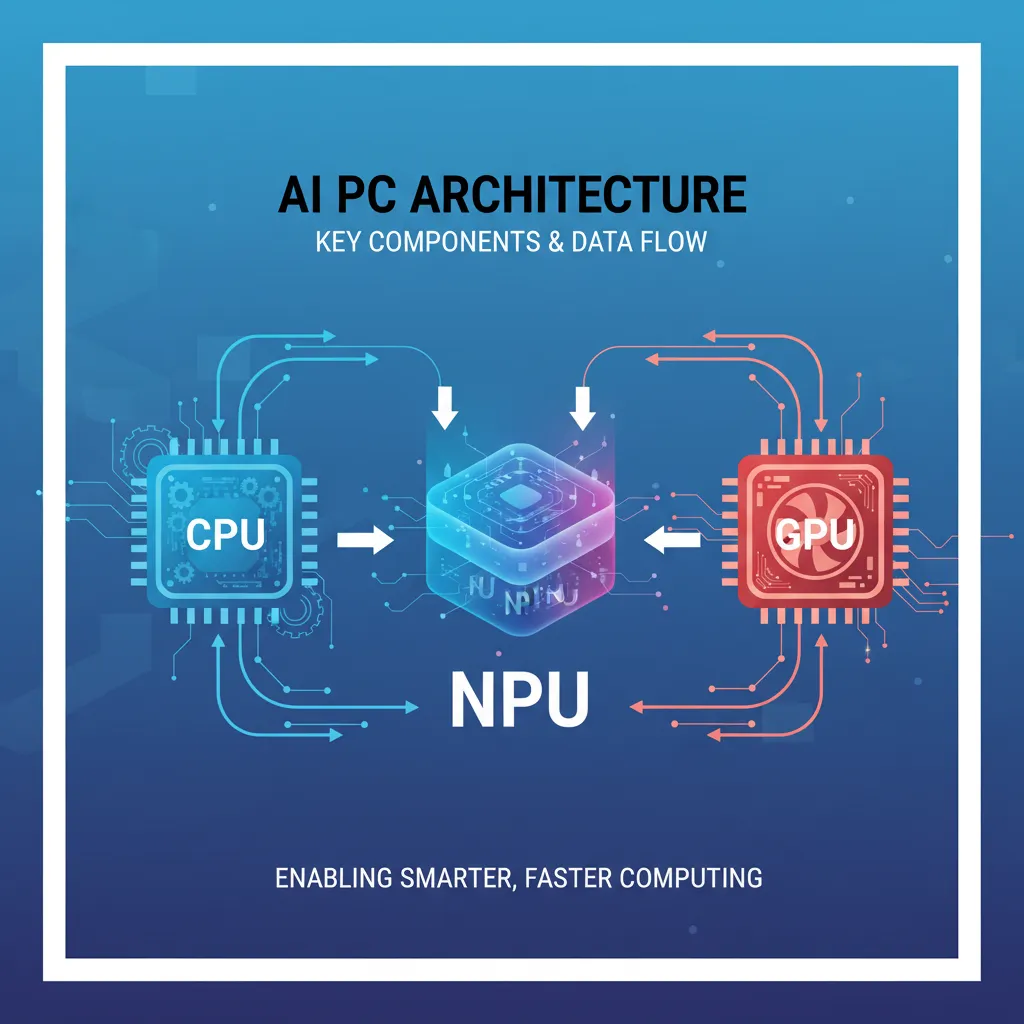
AI Hardware Acceleration: Why On-Device AI Matters
The move toward on-device AI is driven by three powerful factors: performance, efficiency, and security.
1. Instantaneous Performance
When an AI function is executed locally, the response is virtually instantaneous. There is no internet connection needed, eliminating lag caused by network speed. Imagine applying a real-time, highly complex artistic filter to your webcam feed, or having your PC instantly summarize a document you just opened—these are the capabilities unlocked by the dedicated NPU.
2. Unprecedented Power Efficiency
Running constant, low-level AI features (like maintaining eye contact on video calls or enhancing microphone audio) on a CPU would drain the battery rapidly. The Neural Processing Unit is designed for extreme efficiency in AI tasks, meaning an AI laptop can perform these functions constantly while maintaining exceptional battery life—often promising all-day computing. This efficiency is critical for next-gen laptops built on platforms like Windows on ARM.
3. Enhanced Privacy and Security
Perhaps the most compelling argument for the AI PC is privacy. When AI models run locally, your data—your document history, images, private communications—never leaves your device. Features like the contentious yet powerful Windows Recall feature are only feasible because the processing and data indexing occur securely on the device, addressing major user concerns about data transmission.
[Related: The Rise of Edge AI: Unleashing Intelligence at the Device Frontier]
AI PC vs. Regular PC: The Paradigm Shift in Performance
Understanding the difference between an AI PC vs regular PC goes beyond just the presence of an NPU. It’s about a fundamental shift in how the operating system and applications interact with the hardware.
| Feature | Regular Modern PC (2022/2023) | AI PC (2024+) |
|---|---|---|
| Key AI Component | CPU/GPU (General purpose) | Dedicated NPU (Neural Processing Unit) |
| AI Performance (TOPS) | Typically 10–20 TOPS (GPU-dependent) | 40+ TOPS minimum (Dedicated NPU) |
| Primary AI Location | Cloud-dependent (e.g., ChatGPT, Dall-E) | On-device AI (Local processing) |
| Battery Life | Standard (up to 10–12 hours of light use) | Exceptional (often 15–20+ hours) |
| Core Apps | Runs standard apps and cloud-based AI | Runs standard apps and AI-enhanced apps |
| OS Integration | Limited OS-level AI features | Deep OS integration (e.g., Copilot Plus, Apple Intelligence) |
The true advantage of intelligent laptops is not just that they are fast, but that they are contextually aware and constantly learning without bogging down the main processor. This frees up the CPU and GPU for what they do best, leading to a noticeable improvement in multitasking and responsiveness across all applications.
The New Silicon Architecture: Qualcomm, Microsoft, and Apple
The competition driving the AI PC market is fierce, led by major architectural innovations from the Silicon Valley giants.
The Dawn of Copilot+ PC: Microsoft and Snapdragon X Elite
Microsoft’s vision for the AI future is embodied by the Copilot+ PC designation. This label signifies a new class of Windows laptops built specifically to exploit local AI capabilities.
The initial wave of these devices is powered almost exclusively by the Snapdragon X Elite and Snapdragon X Plus chipsets from Qualcomm. These chips leverage the Qualcomm Oryon CPU architecture, which competes directly with Apple’s M-series chips in terms of performance per watt.
The key specification is the integrated NPU, which delivers 45 TOPS of AI performance. This dedication to power efficiency and high AI acceleration allows these Microsoft Surface AI devices, and others from partners like Dell, HP, and Lenovo, to provide the extended battery life and seamless Copilot Plus features Microsoft promises. This generation fully embraces Windows on ARM, providing dramatically better performance and application compatibility than previous attempts.
[Related: Unlock Peak Productivity: Best AI Tools]
Apple Intelligence and the M4 Chip AI Ecosystem
Apple didn’t introduce the concept of the NPU—they were pioneers, integrating the “Neural Engine” into their A-series chips years ago and later making it a central pillar of the M-series chips. The M1, M2, M3, and the latest M4 chip AI all boast extremely powerful Neural Engines capable of 11 to 38 TOPS, depending on the generation.
With the announcement of Apple Intelligence, the company formalized its on-device AI framework, leveraging the hardware acceleration for features like priority notifications, personalized language understanding, and powerful image generation.
Apple’s approach focuses on deep integration within the OS, ensuring that AI features feel intuitive and private. Because the M-series chips are already highly optimized and designed entirely around the Neural Engine, Apple’s AI PC experience is characterized by efficiency and smooth performance, regardless of whether you’re using the M4 for advanced video editing or simple note-taking summaries.
Must-Have AI-Powered Features Driving Adoption
The reason consumers will upgrade to top AI PCs 2024 is simple: the features are genuinely transformative. These capabilities move beyond simple task automation and into the realm of personal productivity enhancement.
The Revolution of Windows Recall
The Windows Recall feature is perhaps the most discussed and powerful example of on-device AI. Recall acts as a photographic memory for your PC. It takes snapshots of everything you do—every app you open, every website you visit, every conversation you have—and stores this data locally, indexing it using AI models.
When you need to find something—say, “that PDF about Q3 earnings I saw last Tuesday while chatting on Teams”—you can use natural language queries, and Recall instantly pulls up the exact moment and context. This powerful feature is only possible because the NPU can process and index this vast stream of data constantly and efficiently without compromising system performance.
Live Captioning, Image Generation, and AI-Enhanced Apps
Beyond Recall, AI-powered features are integrating across the operating system and key applications:
- Live Translation and Captioning: Real-time translation of audio and video feeds, perfect for global collaboration and accessibility.
- Cocreator/Generative AI: Integrated AI tools allow users to sketch an idea and have the NPU instantly generate polished images or refine existing art within apps like Paint. This is a game-changer for digital artists and content creators.
- Studio Effects: Enhanced video conferencing features, including automatic background blur, noise cancellation, improved low-light video, and persistent eye contact correction, all running with minimal battery impact.
- AI-Enhanced Apps: Adobe, DaVinci Resolve, and other software developers are rapidly updating their programs to utilize the NPU for accelerated tasks like complex masking, transcription, and scene detection, dramatically reducing rendering times.
Who Needs an AI PC? Targeting Specific Users
While the future of personal computing suggests everyone will eventually use an AI PC, certain user groups stand to benefit immediately from the superior AI hardware acceleration.
AI PC for Creatives and Media Professionals
The creative workflow demands immense processing power, especially when dealing with high-resolution images, 3D models, and 4K video. An AI laptop equipped with a potent NPU is a creative powerhouse.
- Faster Rendering: The NPU accelerates machine learning models used in denoising and super-resolution, dramatically cutting down wait times in professional suites.
- Intelligent Editing: Features like automatic object detection, smart selections, and content-aware fill can be executed instantly on the device, transforming how artists work.
- Seamless Background Tasks: A video editor can be rendering a project using the GPU while the NPU handles constant noise suppression on a live stream recording and runs the OS-level Copilot AI simultaneously, all without thermal throttling.
/image-topic-2.webp

[Related: Top AI Art Generators 2024]
Best Laptops for AI Development and Machine Learning Laptops
For data scientists and software engineers, the AI PC offers a crucial new platform for development. These devices allow for the rapid prototyping and testing of small and medium-sized machine learning models directly on the client device.
The move to intelligent laptops creates a vital development environment for “Edge AI”—AI models that run locally. Developers working on IoT, smart home devices, or embedded systems benefit immensely from being able to optimize their models directly on the target architecture (ARM-based NPU) before deployment. When looking for the best laptops for AI development, focusing on high NPU TOPS ratings and robust RAM capacity is paramount.
The Everyday User and Future of Personal Computing
For the average student or professional, the AI PC benefits translate into invisible convenience:
- Smarter Search: Instead of searching for keywords, you search for context and concepts (via Recall or Apple Intelligence).
- Instant Summaries: Get quick, accurate summaries of emails, long documents, or meeting transcripts immediately after opening them.
- Superior Battery Life: The efficiency of the NPU means long commutes, lecture halls, or remote work sessions are no longer restricted by battery anxiety.
Comparing the Ecosystem Giants: Copilot+ PC vs. Apple Intelligence
As the AI PC market solidifies, it is largely a two-platform race between Microsoft and Apple, each leveraging its core strengths.
Copilot+ PC: Open Hardware, Comprehensive Features
Microsoft’s strength lies in its ecosystem partnerships. The Copilot+ PC is an open standard that will be adopted by every major Windows manufacturer (Dell, HP, Lenovo, etc.), fostering competition and variety in form factors and price points.
- Key Focus: Maximizing new, powerful features like Recall, Cocreator, and Live Translation. The high 40+ TOPS requirement ensures features run optimally.
- Hardware: Primarily driven by new ARM architectures (Snapdragon X Elite, and eventually Intel Lunar Lake and AMD Strix Point). This signifies a renewed commitment to Windows on ARM.
- Tone: Highly visible AI; Copilot is a physical button and a persistent presence.
Apple Intelligence: Seamless Integration, Privacy-First
Apple’s approach is characteristic of their brand: deeply integrated, designed to feel seamless, and prioritizing user data privacy through on-device AI.
- Key Focus: Elevating daily tasks (writing, managing emails, creating images) with AI that feels invisible and personal. Strong emphasis on private cloud computing for tasks too large for the device.
- Hardware: Exclusively M-series chips (M4 chip AI and successors), ensuring a perfectly optimized software-hardware stack.
- Tone: Subtly integrated AI; it works behind the scenes to improve core system functions without shouting about it.
/image-topic-3.webp
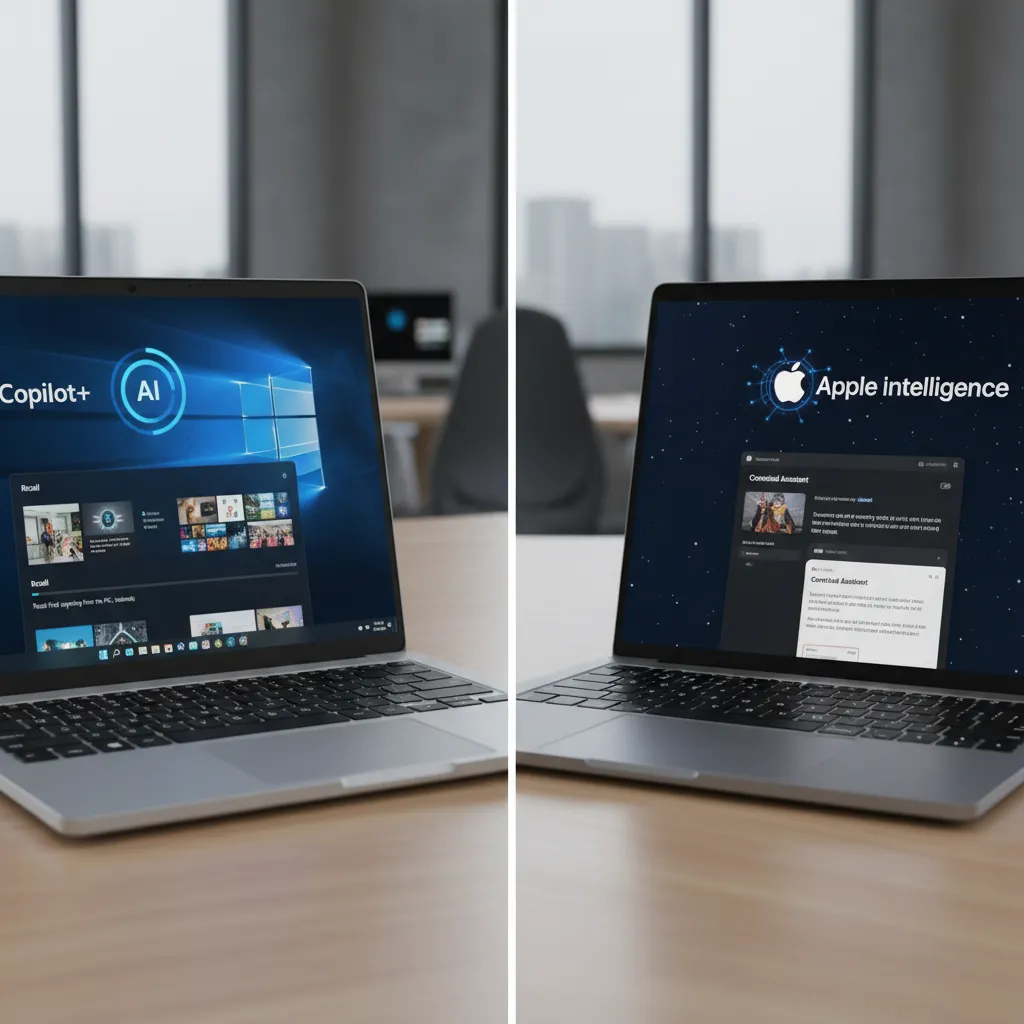
| Feature | Microsoft Copilot+ PC | Apple Intelligence |
|---|---|---|
| Hardware Platform | Snapdragon X Elite/Plus (ARM), Intel Lunar Lake, AMD Strix Point | Apple Silicon (M1, M2, M3, M4) |
| Minimum NPU Power | 40+ TOPS | Varies (up to 38 TOPS for M4), optimized for architecture |
| Signature Feature | Windows Recall, Cocreator | Writing Tools, Image Playground, Priority Notifications |
| OS Integration | Deep integration via Copilot icon/key | Deep integration via Siri and System Settings |
| Data Handling | Primarily on-device, some features use Azure cloud | On-device processing, highly secure Private Cloud Compute for larger models |
Top AI PCs 2024 and What to Look For (Buyer’s Guide)
If you are shopping for an AI PC today, you are essentially looking for a machine that meets the new performance benchmark and battery life standard. The designation of best AI laptops 2024 will evolve, but here are the key criteria and early contenders:
Essential Buying Criteria
- NPU Performance (TOPS): Aim for 40 TOPS or higher if you want the full suite of Microsoft Copilot Plus features and future-proofing.
- RAM: While some AI tasks are offloaded to the NPU, running multiple AI-enhanced apps simultaneously still requires robust memory. 16GB is the effective minimum; 32GB is ideal for heavy users and AI PC for creatives.
- Efficiency: Pay close attention to power efficiency metrics, especially for laptops based on the ARM architecture like the Snapdragon X Elite. Exceptional battery life is a hallmark of this generation.
Early Contenders (Contextual Examples)
- Microsoft Surface Laptop/Pro: Often the benchmark for the Copilot+ PC experience, running the Snapdragon X Elite, showcasing seamless OS integration and efficiency.
- Dell, HP, and Lenovo AI PCs: These manufacturers offer professional-grade AI laptops integrating both ARM and upcoming x86 chips with dedicated NPUs (Intel’s Lunar Lake and AMD’s Strix Point are crucial to watch).
- Apple MacBook Air/Pro (M3/M4): For users already in the Apple ecosystem, the M-series chips provide outstanding power and battery life, with Apple Intelligence unlocking powerful new system features.
The market for intelligent laptops is dynamic, but focusing on the chip and its dedicated NPU power is the most reliable way to ensure you are purchasing a true next-gen laptop.
The Road Ahead: The Future of AI PCs
The current generation of AI PCs is just the beginning. The industry expects the TOPS requirement to double or triple over the next few years. As NPUs become more powerful and developers gain experience programming for them, the capabilities of our devices will blur the line between science fiction and reality.
We can anticipate several major shifts in the future of personal computing:
- Hyper-Personalization: Laptops will become far more personalized. The on-device AI will truly understand your context, habits, and preferences, allowing the device to proactively manage your schedule, tailor learning materials, and adjust interfaces in real-time.
- Ambient AI: AI will become less of a tool you open and more of an omnipresent assistant. Imagine perpetual background indexing of meetings, instant documentation generation, and seamless integration of complex language models into every text field.
- Democratization of AI: By moving computation from expensive cloud servers to the client device, local AI development will become cheaper and faster. This will foster innovation and create a boom in localized, specialized AI-enhanced apps.
The transition to the AI PC is about more than processing power; it’s about making computing feel natural, predictive, and uniquely tailored to the individual.
/image-topic-4.webp

[Related: The Rise of Edge AI: Unleashing Intelligence at the Device Frontier]
Conclusion: Stepping Into the Era of Intelligence
The arrival of the AI PC marks the most exciting inflection point in laptop design and function in over a decade. Whether you are driven by the security of on-device AI, the unprecedented power efficiency of the Snapdragon X Elite, or the seamless integration of Apple Intelligence, the key takeaway remains: these are not just faster laptops—they are fundamentally smarter ones.
The dedicated Neural Processing Unit (NPU) is the engine of this revolution, enabling features like the Windows Recall feature and advanced AI-powered features that are redefining productivity, creativity, and the very concept of the personal computer. If your current device is aging, upgrading to one of the top AI PCs 2024 offers is a genuine investment in the future of personal computing. Don’t be left behind in the cloud—bring the power of machine learning home to your device.
Ready to leverage the power of intelligent laptops? Now is the time to explore how this new laptop technology can transform the way you work, create, and connect.
FAQs About AI PCs and Next-Gen Laptops
Q1. What is the minimum requirement for a laptop to be considered an AI PC?
A modern AI PC is generally defined by the inclusion of a dedicated Neural Processing Unit (NPU) that provides significant AI hardware acceleration. Microsoft’s specific Copilot+ PC standard mandates an NPU capable of delivering at least 40 TOPS (Tera Operations Per Second), distinguishing these truly next-gen laptops from older models that only use the CPU/GPU for AI.
Q2. How does the NPU in an AI laptop work differently from a CPU?
The NPU (Neural Processing Unit) is specialized for the repetitive, matrix-based mathematics required by machine learning algorithms. Unlike the CPU, which is excellent at general, sequential tasks, the NPU is designed for massive parallelism in AI operations. This specialization makes it far more energy-efficient for running constant, low-level on-device AI features, drastically improving battery life.
Q3. What is the difference between an AI PC and a Copilot+ PC?
AI PC is a broad term for any computer optimized for local AI tasks. Copilot+ PC is a specific marketing and performance designation created by Microsoft. A Copilot+ PC must meet Microsoft’s hardware standards (e.g., 40+ TOPS NPU, 16GB RAM minimum) and include specific, deep OS integrations like the Windows Recall feature and Copilot Plus features.
Q4. Are current Macs with M-series chips considered AI PCs?
Yes. Apple’s M-series chips (M1, M2, M3, M4) all feature powerful, integrated “Neural Engines” that function as NPUs. With the release of Apple Intelligence, which leverages these dedicated components for deep system features, these MacBooks fully qualify as high-performance AI laptops.
Q5. What is the Snapdragon X Elite chip, and why is it important for AI PCs?
The Snapdragon X Elite is a powerful ARM-based system-on-a-chip (SoC) designed by Qualcomm, featuring the custom Qualcomm Oryon CPU. It is currently the flagship hardware platform for the initial launch of Copilot+ PC devices, providing the required 45 TOPS of NPU performance and industry-leading power efficiency, setting a high standard for best AI laptops 2024.
Q6. Will AI PCs make my current laptop obsolete immediately?
No, your current laptop is not immediately obsolete. However, features that rely heavily on local processing, such as advanced real-time editing, the Windows Recall feature, or extended, all-day battery life while running AI tasks, will be exclusively or significantly better on the dedicated AI PC hardware. The shift is gradual, but the performance and feature gaps will widen quickly.
Q7. How does an AI PC enhance security?
AI PC benefits security by enabling many sensitive AI tasks to be performed locally. Because data (like your activity history for Recall or personal language models) is processed and stored on the device rather than being sent to the cloud, the risk of data breaches during transmission is eliminated, supporting a more privacy-focused approach to machine learning.